Accounts, permissions, and security
ClinicEdge manages its own accounts and sessions in PocketBase. Native local accounts, ID/PIN identities, and LMS-launched identities have different access boundaries. Legacy compatibility fields do not require a third-party identity service.
Local account controls
Use Administration > Settings > Registration & access defaults to configure allowed email domains, new local registration, and the OTP setup reminder. The reminder can be off, administrators only, or everyone; it is not mandatory OTP enrollment.
Local email/password users can open Account security to enroll an authenticator. Setup requires their password and a valid code, then displays ten single-use recovery codes once. Enabling or disabling OTP revokes existing sessions. Password reset does not remove OTP.
Administrator settings on a narrow screen
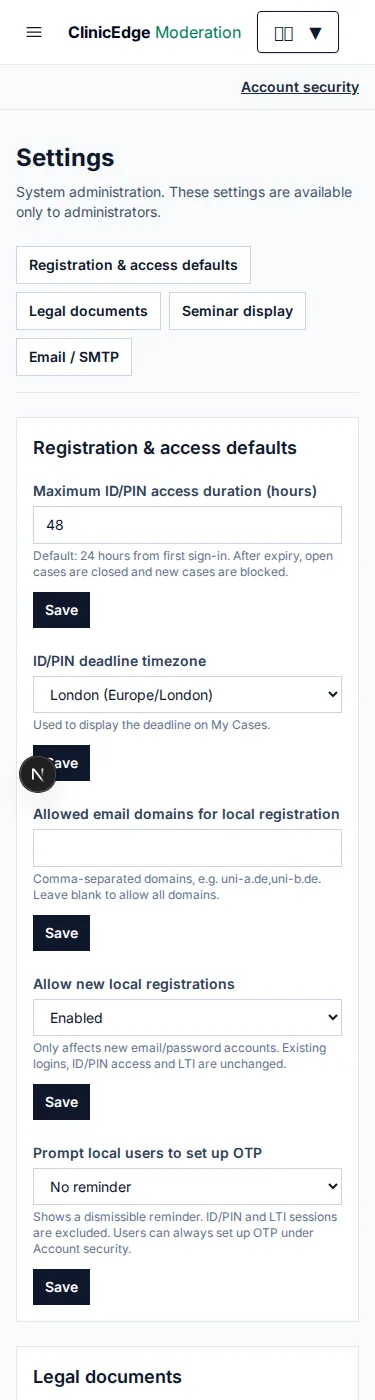
Synthetic settings example. The reminder is not mandatory OTP enforcement.
If a user loses both authenticator and recovery codes, a trusted operator must verify their identity, clear only that local identity's profile.local_otp, and revoke its sessions. There is no public OTP-reset bypass. Handle this as an audited recovery procedure, not an ordinary moderator task.
Delegate access deliberately
- Application administrators have system-wide privileges.
- Content edit/review permissions are separate by entry type.
- Classroom, questionnaire, Stats, access-code, study, and bug-report tools are independently delegated. Classroom/questionnaire viewing and management are separate capabilities; Stats is a read-only viewing/download grant.
- Supervision requires assignment to the particular classroom; moderation alone is insufficient.
- Restricted LTI and ID/PIN learner access must not be treated as staff authority.
See the capability matrix before granting access. Classroom membership as a learner is not a staff assignment.
Public and private surfaces
Keep PocketBase credentials server-side and its dashboard IP-restricted. Do not publicly cache authenticated reports, protected images, consent documents, private signup pages, monitor responses, or seminar-display content.
Projection links are capabilities: possession can permit reading selected content until expiry/revocation. The display hub uses separate PIN/OTP access and is not a staff login.
Redact sensitive signup/display/monitor paths and referrers in every proxy, CDN, logging, and tracing layer. Application protections are not a guarantee that an external infrastructure log cannot capture a secret. Do not use analytics on private registration or consent routes.
Incident preparation
Agree on access revocation, key custody, recovery, data handling, and external uptime alerts. Preserve evidence without exporting live credentials into tickets. An expired account is not automatically a withdrawn research participant; follow data-governance procedures.